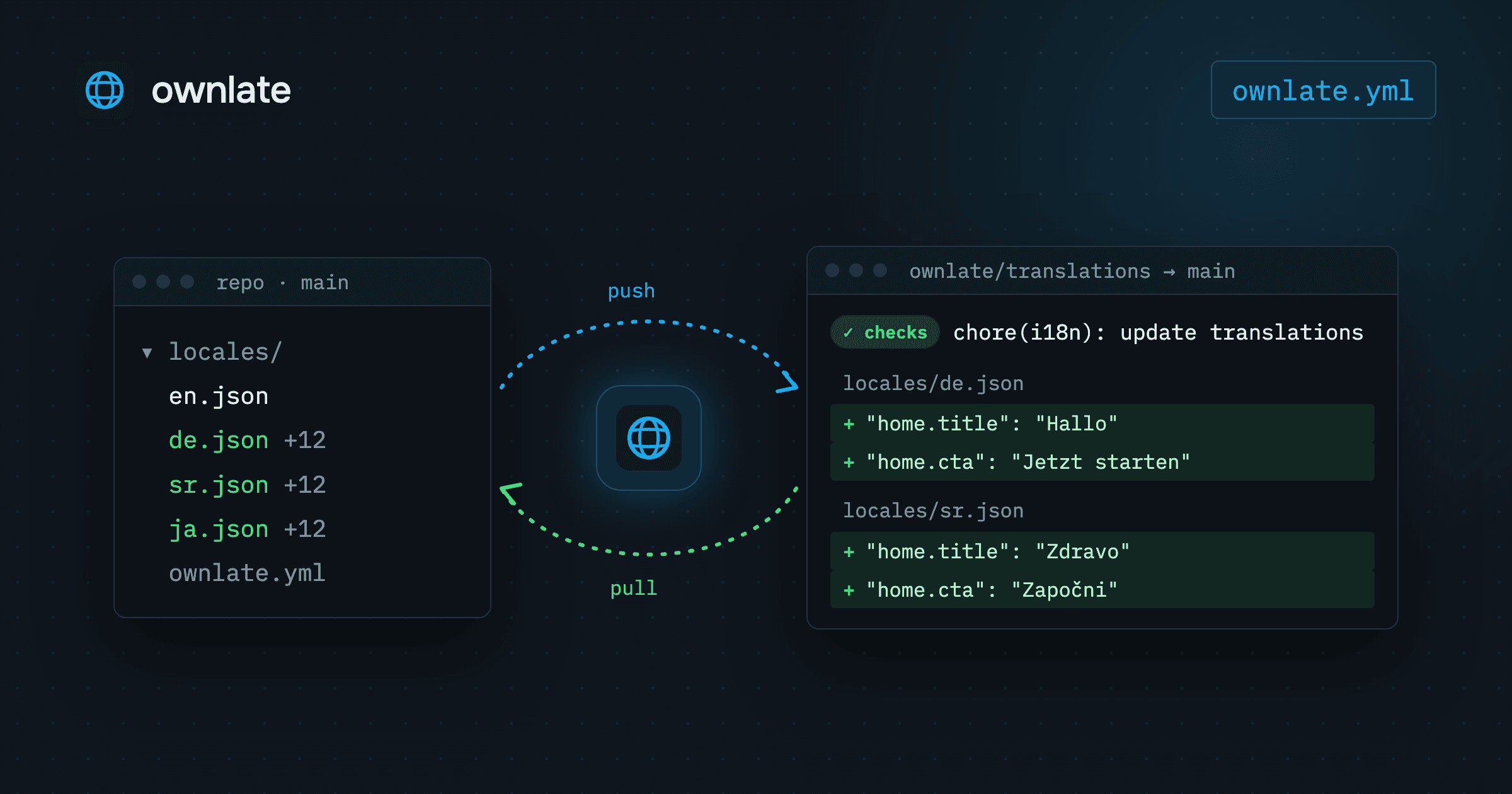
Your application reads its strings from files such as locales/de.json, so those files belong in the same repository as the code that loads them. A git localization workflow keeps it that way: developers commit the source language, translation happens outside the codebase, and the translated files come back through the same review path as any other change. This guide explains why that matters and how the loop works in Ownlate, from ownlate.yml to a merged pull request.
Why keep translation files in Git
A build should be reproducible from a commit. If the German strings for version 2.4 live only in an external dashboard, checking out the 2.4 tag no longer gives you the 2.4 app. With translation files in the repository, the tag carries the text that shipped with it.
Keeping them in Git also gives you:
- Diffs. A changed translation is a changed line, next to the code change that needed it.
- History.
git logandgit blamework on strings the same way they work on code. - One review path. Translations arrive as a pull request, run through CI and are merged by someone on the team.
- No runtime dependency. The app ships with the files it needs.
What Git does not track is the translation work itself: which strings are new, which are waiting for review, which were approved. That is the job of the translation platform. The repository stays the place where files live. Ownlate is where they get translated.
How the git localization workflow runs in Ownlate
The loop has five steps:
ownlate.ymlin the repository maps each source file to the path its translations are written to.ownlate pushuploads the source file. Every key becomes a segment.- Translation memory, machine translation and translators fill in the target languages.
- Reviewers mark translations reviewed and approve them.
- Translations come back as a pull request from the GitHub or GitLab integration, or through
ownlate pull.
Map source files in ownlate.yml
The CLI and the Git integration read the same file, ownlate.yml at the root of the repository:
project_id: f4092389-de6a-49ee-af84-46d59ba618f0
api_token_env: OWNLATE_API_TOKEN

files:
  - source: locales/en.json
    translation: locales/{lang}.json
    languages_mapping:
      zh-Hans: zh_CN
source is the file your developers edit. translation is where each language is written, and it must contain {lang}. With this mapping, German lands in locales/de.json, and languages_mapping writes Simplified Chinese to locales/zh_CN.json rather than locales/zh-Hans.json. api_token_env names the environment variable that holds the API token, so a CI job needs no other setup.
Ownlate parses JSON, YAML, PO (gettext), Markdown and MDX. Nested JSON and YAML keys are flattened with dots, so {"home": {"title": "Hello"}} becomes the key home.title.
Push new keys
The CLI is published as a Docker image. From the repository root:
export OWNLATE_API_TOKEN=own_xxxxxxxxxxxx
docker run --rm -v "$PWD:/app" -w /app -e OWNLATE_API_TOKEN globalartltd/ownlate-cli push
To keep the rest of this guide short, define an alias:
alias ownlate='docker run --rm -v "$PWD:/app" -w /app -e OWNLATE_API_TOKEN globalartltd/ownlate-cli'
ownlate push uploads every files[].source and creates or updates segments from it. Uploading the same file again is how changes travel: an existing key has its source text updated, a new key is added, and the order of the file becomes the order of the segments. Run ownlate push --dry-run to see what would be pushed without uploading anything.
With the GitHub or GitLab integration connected, Ownlate can read the sources itself. The integration takes a repository URL, a branch (main by default) and an access token. On sync, it reads ownlate.yml from the root of that branch, fetches each source file and uploads it the same way a push would. A file listed in the config but missing from the repository is skipped and noted in the sync log. Sync runs in the background and can be triggered from the project's Integrations tab or with PATCH /v1/workspaces/{workspaceId}/integrations/{id}/sync.
Fill in translations: memory, machine translation, people
A new key starts as untranslated in every target language. Instead of starting from nothing, pre-translate:
ownlate translate --provider tm --score 90
ownlate translate --provider mt --lang de
- Translation memory (
tm, the default). An exact match is applied and approved outright. A fuzzy match above the--scorethreshold is left as adraft. - Machine translation (
mt, the built-in AI engine). The result lands inneeds_review, so a person still checks it.
Pre-translation runs in the background on the server. ownlate status prints a progress table for every target language. What is left goes to translators in the web editor, which shows the source text, context, translation memory matches and glossary terms next to each string.
Review decides what ships
Every translation has a status:
| Status | Meaning |
|---|---|
untranslated |
Nothing has been written yet |
draft |
Saved as work in progress, not submitted |
needs_review |
Submitted, waiting for a reviewer |
reviewed |
Checked by a reviewer, waiting for approval |
approved |
Signed off |
in_progress |
Rejected and being reworked |
outdated |
The source text changed after this translation was written |
Approval is the step that makes a translation shippable. Three things happen at once: the translation is stamped approved, the source and target pair is written to the workspace translation memory so the next similar string comes pre-filled, and the words are counted against your plan's allowance.
Rejection reopens a translation without erasing it. It goes back to in_progress with its text kept, so the translator reworks the string instead of retyping it.
When a segment's source text is edited, every non-empty translation of it is marked outdated, because the text a translator approved no longer describes what the product says. Languages that were never translated stay untranslated.
Get translations back as a pull request
With the GitHub or GitLab integration, Create PR closes the loop. Ownlate exports the translations for the languages you pick, writes them to the paths from ownlate.yml, pushes the branch ownlate/translations and opens a pull request titled chore(i18n): update translations via Ownlate. On GitLab it is a merge request. The response carries the URL, so a pipeline can pick it up. The access token needs enough scope to read the repository, push a branch and open a pull request.
From there it is an ordinary pull request: a diff of locales/*.json that your team reads, CI runs against and someone merges.
To write the files from a script or a CI job instead:
ownlate pull            # every target language
ownlate pull --lang de  # one language
pull downloads translated files into the paths given by files[].translation. Commit them like any other change.
Two details apply to exported files. Untranslatable segments, such as a brand name, are always written with their source text. A segment with plural forms has no single string to put in a flat file, so ship plural strings through a release bundle, which carries the forms intact.
Run it in CI
push, pull, status and translate need only project_id and api_token_env, so a pipeline has no login step:
- name: Push source strings
  run: docker run --rm -v "$PWD:/app" -w /app -e OWNLATE_API_TOKEN globalartltd/ownlate-cli push
  env:
    OWNLATE_API_TOKEN: ${{ secrets.OWNLATE_API_TOKEN }}

- name: Fail if a language is behind
  run: docker run --rm -v "$PWD:/app" -w /app -e OWNLATE_API_TOKEN globalartltd/ownlate-cli status --min 90
  env:
    OWNLATE_API_TOKEN: ${{ secrets.OWNLATE_API_TOKEN }}
status --min 90 exits with code 1 if any language is below 90 percent, which turns translation progress into a check your pipeline can enforce.
A practical rhythm: push on every merge to your default branch, and pull or open the translation pull request on a schedule or before a release. Translation work is tracked in Ownlate, and every build stays reproducible from the repository.
Further reading
- Getting started: the whole path in one page
- CLI: every command, flag and
ownlate.ymloption - Files, formats and export: formats, re-uploads and export
- Integrations: GitHub and GitLab sync and pull requests
- The translation workflow: statuses, review and rejection
- Translation memory and AI translation: pre-translation sources
- Releases and OTA: translations at runtime
The Free plan includes one project and 10 000 words in every file format, with no card required.